Tunde
TundeThis guide explains how to fill JAMB Form 2026 correctly using the official UTME Registration Template.
Every year, thousands of candidates make avoidable mistakes during JAMB registration by filling the jamb registration form incorrectly. Errors such as wrong subject combination, incorrect course or institution, and mismatched personal details can seriously affect admission chances.
Filling the JAMB form correctly is extremely important because a single mistake can lead to:
- Wrong subject combination, which may cause automatic disqualification
- Wrong course or institution selection, making you ineligible for admission
- Disqualification, even with a high UTME score
All JAMB registrations are conducted and regulated by the Joint Admissions and Matriculation Board (JAMB), which is the only authority responsible for the UTME and Direct Entry examinations in Nigeria.
This guide is carefully prepared to follow the official 2026 UTME Registration Template, ensuring that every step you take aligns with JAMB requirements and helps you avoid costly errors.
Read carefully and use this guide before filling your JAMB 2026 form.
Important Warnings Before Filling JAMB Form 2026
Before you begin your JAMB registration, read these warnings carefully. Ignoring them is one of the main reasons candidates make costly mistakes every year.
- Do NOT pay for the registration template. The template is free and meant only to guide you. Anyone asking you to pay for it is misleading you.
- Do NOT submit the template to the CBT centre. The template is for your personal preparation, not a document to be uploaded or collected at the centre.
- Fill the template in CAPITAL LETTERS only. This reduces errors and ensures your details are entered correctly during registration.
- All biodata must match your NIMC records exactly. Your name, date of birth, gender, and other personal details must be the same as what is on your NIN record.
- Corrections must be done at NIMC before registration, not after. If there is any mistake in your name or date of birth, you must correct it at NIMC before going to a CBT centre. JAMB will not fix NIMC-related errors after registration.
Any mismatch between your NIMC data and JAMB registration details can lead to serious issues later in the admission process.
Understanding the JAMB 2026 Registration Template
The JAMB 2026 Registration Template is divided into five main sections, each covering a specific part of your registration. Understanding these sections helps you prepare properly and avoid rushing at the CBT centre.
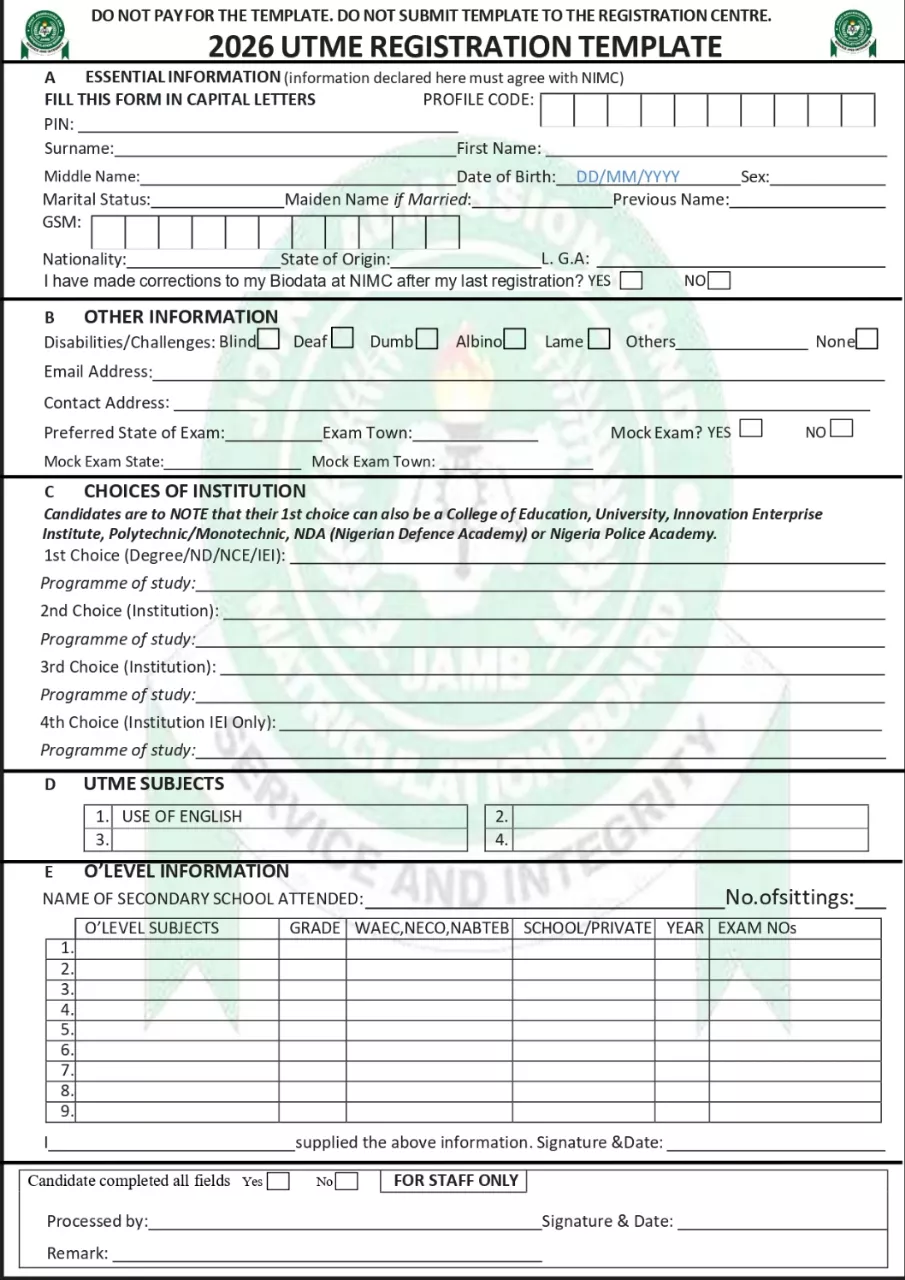
Sections in the JAMB Registration Template
- Section A: Essential Information
This covers your biodata such as names, date of birth, gender, phone number, nationality, state, LGA, and NIMC-related details. - Section B: Other Information
Includes contact address, email, disability status (if any), exam state/town, and mock exam selection. - Section C: Choice of Institution
Where you choose your course of study and select your 1st, 2nd, and other institutions. - Section D: UTME Subjects
English Language (compulsory) and the other three subjects based on your chosen course. - Section E: O’Level Information
Details of your WAEC/NECO/NABTEB results, including subjects, grades, sittings, exam number, and year.
Why You Must Fill the Template Before Visiting a CBT Centre
- It helps you think through your choices calmly
- Reduces pressure and mistakes at the CBT centre
- Saves time during registration
- Ensures correct subject combination and course selection
- Helps CBT operators enter your details accurately
Complete the entire template at home, review it carefully, then go to the CBT centre fully prepared.
Section A – Essential Information
This section captures your personal biodata. Any mistake here can affect your entire registration, so fill it carefully and accurately.
- Profile Code: This is the code generated after sending your NIN to JAMB. Ensure it is correct and belongs to you.
- PIN: This is the JAMB e-PIN purchased from approved vendors. Enter it exactly as given.
- Surname, First Name, Middle Name: Enter your names exactly as they appear on your NIMC record. Do not rearrange or abbreviate names.
- Date of Birth (DD/MM/YYYY): Your date of birth must match what is on your NIN. Even a one-day difference can cause issues.
- Sex & Marital Status: Select the correct options as shown on your official records.
- Maiden Name / Previous Name (if applicable): Only fill this if you have officially changed your name. Otherwise, leave it blank.
- GSM Number: Use an active phone number you have access to. JAMB will use this number to send important information.
- Nationality, State of Origin, LGA: Choose correctly. These details must align with your NIMC information.
- NIMC Biodata Correction Question (YES/NO): Select YES only if you have already corrected your biodata at NIMC before registration. Otherwise, select NO.
All information in this section must exactly match your NIMC details. JAMB will not correct name or date-of-birth errors after registration.
Section B – Other Information
This section contains additional but very important details that affect communication and examination logistics.
- Disabilities / Challenges: Select YES only if you have a genuine physical challenge. This helps JAMB provide necessary assistance. Otherwise, select NO.
- Email Address: Use an active and accessible email address. JAMB may send updates, notifications, or recovery information to this email.
- Contact Address: Enter your current residential address correctly.
- Preferred State of Exam & Exam Town: Choose a state and town close to where you live to reduce transport stress on exam day.
- Mock Exam (YES/NO): Select YES only if you intend to write the JAMB mock exam. If you select NO, you will not be scheduled for the mock.
- Mock Exam State & Town: This option appears only if you choose YES for the mock exam. Select a convenient location.
The mock exam is optional, but it is highly recommended for candidates who want to understand the CBT environment before the main UTME.
Section C – Choice of Institution
This section determines where and what you will study. Many candidates lose admission here due to wrong selections.
- 1st Choice Institution
Select the correct institution type:- University
- Polytechnic
- College of Education (COE)
- Innovative Enterprise Institution (IEI)
- Nigerian Defence Academy (NDA)
- Nigeria Police Academy
Choose carefully, your 1st choice is the most important.
- Programme of Study
Select the exact course you intend to study (e.g. Medicine and Surgery, Law, Engineering). Ensure the course exists in the institution you selected. - 2nd Choice Institution
This serves as a backup. Choose a realistic option with correct subject requirements. - 3rd Choice Institution
Optional but useful as an additional backup. - 4th Choice (IEI only)
This option applies only to Innovative Enterprise Institutions.
Important Warnings
- Choosing the wrong institution type (e.g. Polytechnic for a university-only course) can lead to disqualification.
- Choosing the wrong course makes your UTME subjects invalid.
Always ensure your UTME subject combination matches your chosen course.
Section D – UTME Subjects
This is one of the most sensitive sections of the JAMB form.
What to Select
- English Language – Compulsory for all candidates
- Other Three Subjects – Must be based strictly on your chosen course
Matching Subjects with Course Requirements
Each course has specific subject combinations approved by Joint Admissions and Matriculation Board (JAMB). Selecting even one wrong subject can disqualify you, regardless of your UTME score.
Consequences of Wrong UTME Subjects
- Ineligibility for admission
- Rejection during Post-UTME screening
- Loss of admission even with a high score
Always check official JAMB subject combination guides for your course before submitting this section.
Section E – O’Level Information (WAEC / NECO / NABTEB)
This section contains your secondary school results and must be filled accurately.
- Name of Secondary School Attended: Enter the full and correct name of your school.
- Number of Sittings: Select 1 sitting or 2 sittings only. (Note: Some universities accept one sitting only.)
- O’Level Subjects and Grades: Enter the required subjects and your correct grades (A1–F9).
- Exam Body
- WAEC
- NECO
- NABTEB
- School or Private Candidate: Choose correctly based on how you sat for the exam.
- Exam Year; Enter the correct examination year.
- Exam Number: Enter exactly as shown on your result slip.
- Combination of Results: You can combine WAEC + NECO or other accepted bodies if your chosen institution allows it.
- Common Mistakes to Avoid:
- Entering wrong grades
- Selecting wrong subjects
- Using subjects not relevant to your course
- Typing incorrect exam numbers
Cross-check your result slip before submission, errors here can cost you admission.
Final Confirmation & Declaration Section
This is the last and most critical stage of your JAMB registration. Once submitted, correcting errors can be difficult or impossible.
What This Section Involves
- Candidate Declaration: You are required to confirm that all information provided is correct and belongs to you.
- Signature and Date: This shows that you personally approved the information entered during registration.
- Before clicking final submit, carefully review: Your names and date of birth, Course and institution choices, UTME subjects and O’Level subjects and grades
- A small mistake here can cost you admission.
- “Candidate Completed All Fields – YES / NO”
-
- YES means all required sections have been filled correctly
- NO means there is missing or incomplete information
Always ensure YES is selected before final submission And Never rush this stage. Take your time and confirm everything.
Common Mistakes Candidates Make When Filling JAMB Form
Avoid these frequent errors that affect thousands of candidates every year:
- Wrong spelling of names
- Mismatch between JAMB details and NIMC records
- Wrong UTME subject combination
- Choosing the wrong course or institution
- Selecting mock exam unintentionally
- Entering incorrect O’Level subjects or grades
Most of these mistakes happen because candidates rush or fail to prepare properly before visiting a CBT centre.
RELATED POST:
New JAMB Novel 2026: The Lekki Headmaster Summary & Review
JAMB Timetable 2026 for UTME & Direct Entry
JAMB 2026 Registration Date Announced: Form Price, Deadline & New Novel
How to Generate JAMB Profile Code for 2026
How to Buy JAMB e-PIN 2026 Online: Remita, Opay & Interswitch
Conclusion
Filling the JAMB Form 2026 correctly is just as important as preparing for the exam itself. A single mistake during registration, wrong subject combination, incorrect biodata, or wrong course can lead to disqualification, even with a high UTME score.
Candidates are strongly encouraged to fill the official registration template completely at home before visiting any CBT centre. This reduces pressure, prevents errors, and ensures your information is entered accurately.
Also, register early to avoid last-minute stress, overcrowded centres, and network issues.
Save this guide, share it with friends, and fill your JAMB 2026 form correctly.


 Tunde
Tunde